(1) 아두이노 UNO R3와 연결해서 가속도, 자이로 센터 데이터 출력 하기
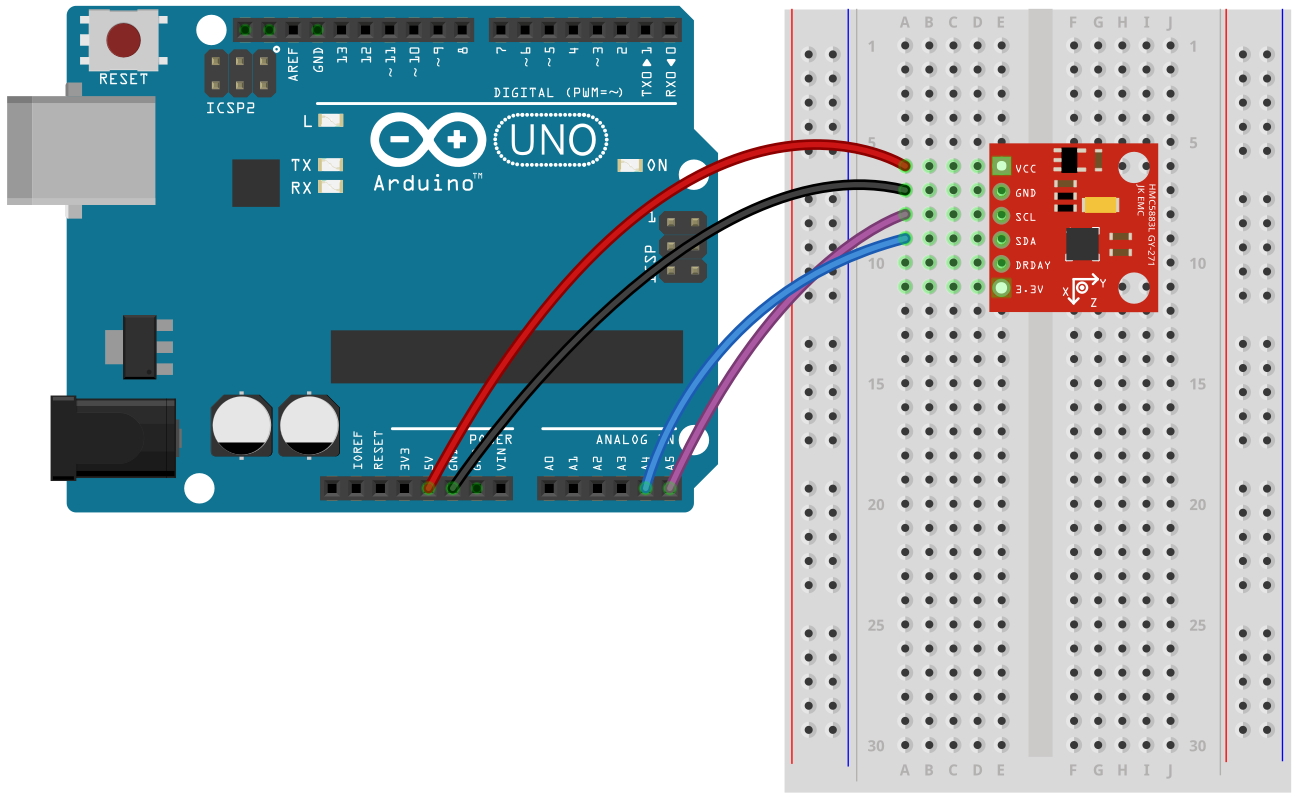
아두이노의 A5를 센서의 SCL, A4를 센서의 SDA핀에 연결을
하면 된다. 본 제품은 내부에 회로적으로 3.3V전원
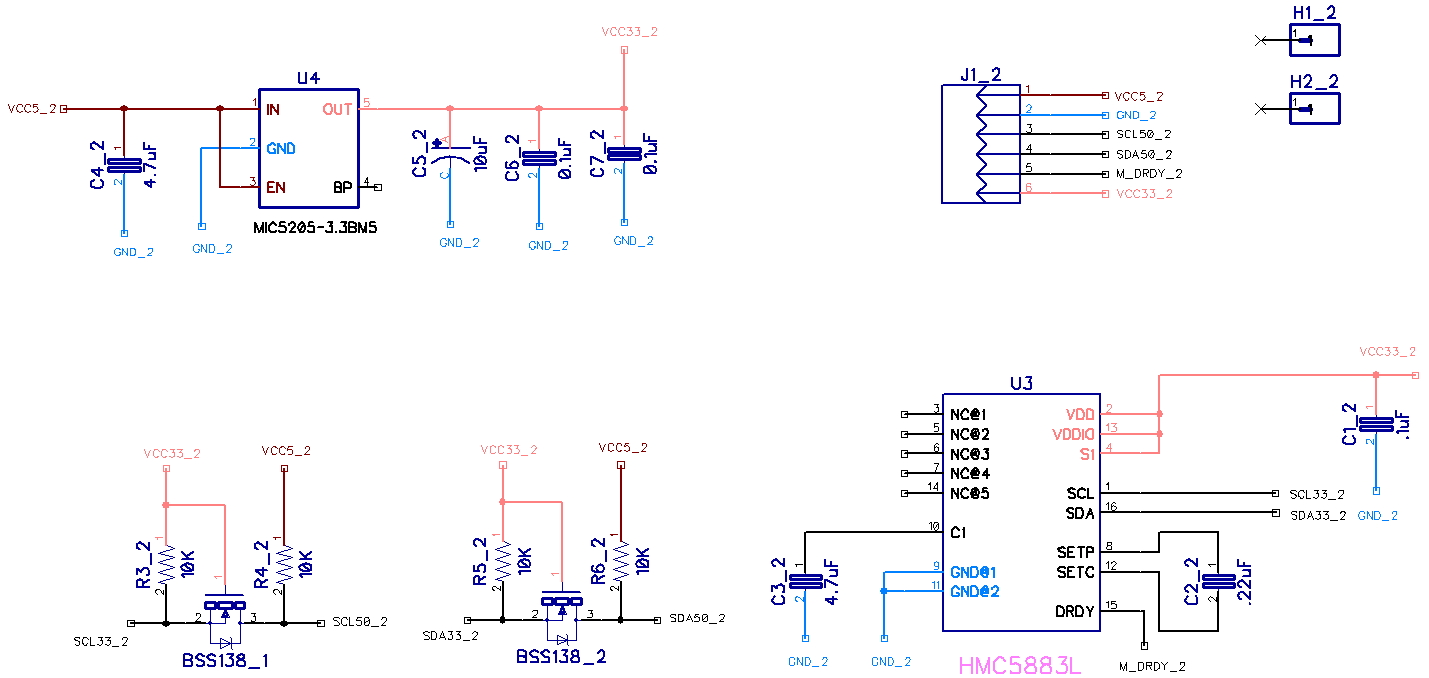
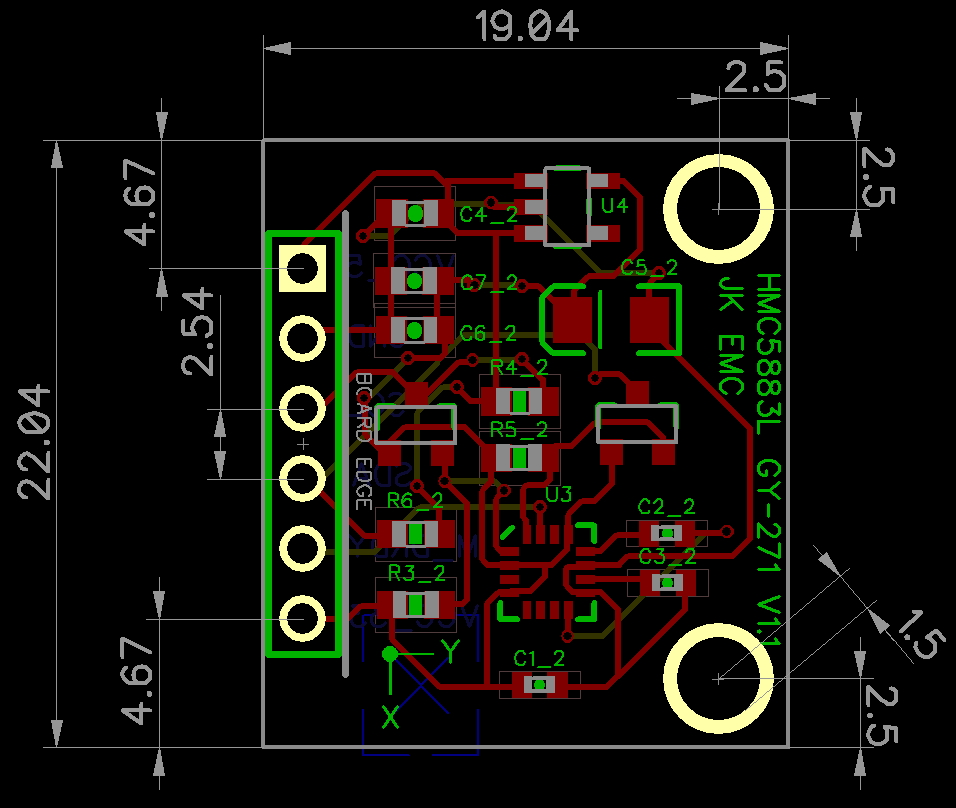
레듈레이터와 I2C 레벨쉬프터를 내장하고 있어서 5.0V와 3.3V 에서 모두 사용이 가능 하다. STM32, 라즈베리파이 등과
같이 3.3V 전원을 사용하는 프로세서에서 사용할 경우에는 VCC 대신에 3.3V 핀을 통해서 전원을 바로 연결해 주면 된다.
// I2C device class (I2Cdev) demonstration Arduino sketch for HMC5883L class // 10/7/2011 by Jeff Rowberg <jeff@rowberg.net> // Updates should (hopefully) always be available at https://github.com/jrowberg/i2cdevlib // // Changelog: // 2013-05-04 - Added Heading Calculation in degrees // 2011-10-07 - initial release /* ============================================ I2Cdev device library code is placed under the MIT license Copyright (c) 2011 Jeff Rowberg Permission is hereby granted, free of charge, to any person obtaining a copy of this software and associated documentation files (the "Software"), to deal in the Software without restriction, including without limitation the rights to use, copy, modify, merge, publish, distribute, sublicense, and/or sell copies of the Software, and to permit persons to whom the Software is furnished to do so, subject to the following conditions: The above copyright notice and this permission notice shall be included in all copies or substantial portions of the Software. THE SOFTWARE IS PROVIDED "AS IS", WITHOUT WARRANTY OF ANY KIND, EXPRESS OR IMPLIED, INCLUDING BUT NOT LIMITED TO THE WARRANTIES OF MERCHANTABILITY, FITNESS FOR A PARTICULAR PURPOSE AND NONINFRINGEMENT. IN NO EVENT SHALL THE AUTHORS OR COPYRIGHT HOLDERS BE LIABLE FOR ANY CLAIM, DAMAGES OR OTHER LIABILITY, WHETHER IN AN ACTION OF CONTRACT, TORT OR OTHERWISE, ARISING FROM, OUT OF OR IN CONNECTION WITH THE SOFTWARE OR THE USE OR OTHER DEALINGS IN THE SOFTWARE. =============================================== */ // Arduino Wire library is required if I2Cdev I2CDEV_ARDUINO_WIRE implementation // is used in I2Cdev.h #include "Wire.h" // I2Cdev and HMC5883L must be installed as libraries, or else the .cpp/.h files // for both classes must be in the include path of your project #include "I2Cdev.h" #include "HMC5883L.h" // class default I2C address is 0x1E // specific I2C addresses may be passed as a parameter here // this device only supports one I2C address (0x1E) HMC5883L mag; int16_t mx, my, mz; #define LED_PIN 13 bool blinkState =false; voidsetup() { // join I2C bus (I2Cdev library doesn't do this automatically) Wire.begin(); // initialize serial communication // (38400 chosen because it works as well at 8MHz as it does at 16MHz, but // it's really up to you depending on your project) Serial.begin(9600); // initialize device Serial.println("Initializing I2C devices..."); mag.initialize(); // verify connection Serial.println("Testing device connections..."); Serial.println(mag.testConnection() ?"HMC5883L connection successful":"HMC5883L connection failed"); // configure Arduino LED for pinMode(LED_PIN, OUTPUT); } voidloop() { // read raw heading measurements from device mag.getHeading(&mx, &my, &mz); // display tab-separated gyro x/y/z values Serial.print("mag:\t"); Serial.print(mx); Serial.print("\t"); Serial.print(my); Serial.print("\t"); Serial.print(mz); Serial.print("\t"); // To calculate heading in degrees. 0 degree indicates North float heading = atan2(my, mx); if(heading <0) heading +=2* M_PI; Serial.print("heading:\t"); Serial.println(heading *180/M_PI); // blink LED to indicate activity blinkState =!blinkState; digitalWrite(LED_PIN, blinkState); }
HMC5883L의 Slave Address는 0x1E 1개의 어드레스만 가지고 있다.
#define HMC5883L_ADDRESS 0x1E
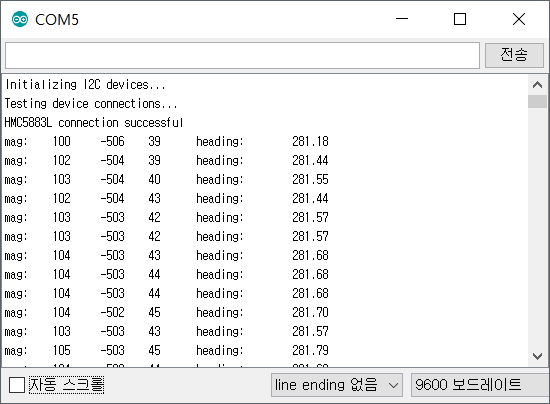
(2) 실행 결과
HMC5883L과의 I2C 통신 상태를 검사하고 3축의 지자기 값을 반복해서 보여준다.
(1) 프로세싱 설치 -
프로세싱 개발환경 설치 하기(새창)
프로세싱코드는 HMC5883L 모듈에서 출력하는 데이터를 시리얼(RS232) 통신을
통해서 입력을 받아 데이터를 처리 하도록 되어 있다. 이제 아두이노와 HMC5883L 모듈을 이용해서 프로세싱에서 처리 하기
위한
데이터 출력을 해보자.
3.2
아두이노 UNO R3 배선도
배선도는 이전 예제와 동일하다.
3.3
아두이노 스케치 코드
(1) 아두이노 프로세싱 코드
프로세싱 코드에서 한가지 주의 해야할 사항은 처리 속도를 빠르게 하기 위해서 시리통 통신의 속도를 115200bps 로 설정을
하였다. 그렇기 때문에 아두이노의 시리얼 모니터창에서도 동일한 통신속도를 맞추어 주어야 한다.
/* HMC5883L Triple Axis Digital Compass. Output for HMC5883L_processing.pde Read more: http://www.jarzebski.pl/arduino/czujniki-i-sensory/3-osiowy-magnetometr-hmc5883l.html GIT: https://github.com/jarzebski/Arduino-HMC5883L Web: http://www.jarzebski.pl (c) 2014 by Korneliusz Jarzebski */ #include <Wire.h> #include "hmc5883l.h" HMC5883L compass; int previousDegree; voidsetup() { Serial.begin(9600); // Initialize HMC5883L while (!compass.begin()) { delay(500); } // Set measurement range compass.setRange(HMC5883L_RANGE_1_3GA); // Set measurement mode compass.setMeasurementMode(HMC5883L_CONTINOUS); // Set data rate compass.setDataRate(HMC5883L_DATARATE_30HZ); // Set number of samples averaged compass.setSamples(HMC5883L_SAMPLES_8); // Set calibration offset. See HMC5883L_calibration.ino compass.setOffset(0, 0); } voidloop() { long x = micros(); Vector norm = compass.readNormalize(); // Calculate heading float heading = atan2(norm.YAxis, norm.XAxis); // Set declination angle on your location and fix heading // You can find your declination on: http://magnetic-declination.com/ // (+) Positive or (-) for negative // For Bytom / Poland declination angle is 4'26E (positive) // Formula: (deg + (min / 60.0)) / (180 / M_PI); float declinationAngle = (4.0+ (26.0/60.0)) / (180/ M_PI); heading += declinationAngle; // Correct for heading < 0deg and heading > 360deg if (heading <0) { heading +=2* PI; } if (heading >2* PI) { heading -=2* PI; } // Convert to degrees float headingDegrees = heading *180/M_PI; // Fix HMC5883L issue with angles float fixedHeadingDegrees; if (headingDegrees >=1&& headingDegrees <240) { fixedHeadingDegrees = map(headingDegrees, 0, 239, 0, 179); } else if (headingDegrees >=240) { fixedHeadingDegrees = map(headingDegrees, 240, 360, 180, 360); } // Smooth angles rotation for +/- 3deg int smoothHeadingDegrees = round(fixedHeadingDegrees); if (smoothHeadingDegrees < (previousDegree +3) && smoothHeadingDegrees > (previousDegree -3)) { smoothHeadingDegrees = previousDegree; } previousDegree = smoothHeadingDegrees; // Output Serial.print(norm.XAxis); Serial.print(":"); Serial.print(norm.YAxis); Serial.print(":"); Serial.print(norm.ZAxis); Serial.print(":"); Serial.print(headingDegrees); Serial.print(":"); Serial.print(fixedHeadingDegrees); Serial.print(":"); Serial.print(smoothHeadingDegrees); Serial.println(); // One loop: ~5ms @ 115200 serial. // We need delay ~28ms for allow data rate 30Hz (~33ms) delay(30); }
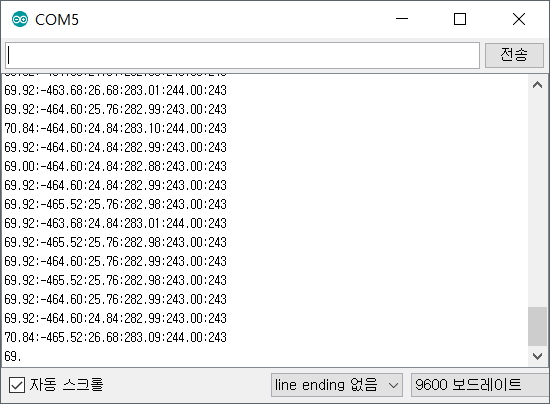
(2) 실행 결과
아두이노 시리얼 모니터창에서 반드시 보드레이트(Baudate)를 9600 으로 수정 해야 한다. 그렇지
않으면 시리얼 모니터 창에 아무런 데이터가 표시되지 않거나 잘못된 데이터가 표시될 것이다. 프로세싱 데이터를 처리하기 위한
데이터 이므로 데이터를 바로 판독하기는 어렵다. 데이터가 올바르게 표시되는것을 확인 하였다면 프로세싱에서 동일한 시리얼포트를
사용해야 하기 때문에 아두이노 시리얼 모니텅 창을 닫도록 하자.
3.4
프로세싱 코드
프로세싱 코드에서 한가지 주의 해야할 사항은 시리얼 포트를 각자의 환경에 맞추어서 수정을 해주어야 한다는 것이다.
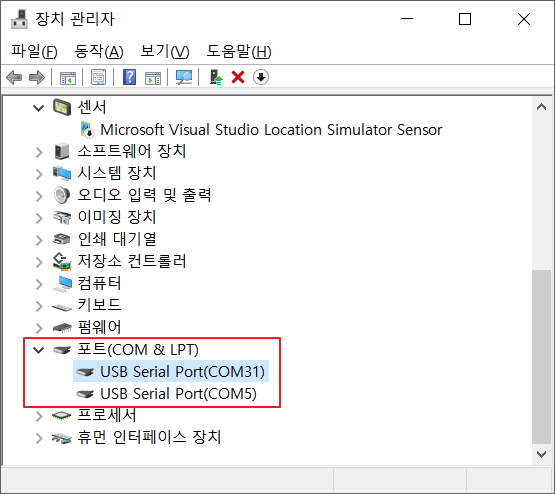
아래 프로세싱 코드에서 "[0]" 의 0이라는 숫자는 장치관리자에서 COM포트의 번호가 아니라 포트의 순서라는것에 주의 해야 한다.
위의 장치관리자 화면에서 예를 든다면 다음과 같다.
Serial.list()[0]; // --> COM31
Serial.list()[1]; // --> COM5

프로세싱 코드를 실행할때 테스트하는 PC의 COM 포트 상태에 따라서 "Serial.list()[0]" 의 숫자를 바꾸어 주어야 한다.
(1) 프로세싱 코드
/* HMC5883L Triple Axis Digital Compass. Processing for HMC5883L_processing.ino Processing for HMC5883L_processing_MPU6050.ino Read more: http://www.jarzebski.pl/arduino/czujniki-i-sensory/3-osiowy-magnetometr-hmc5883l.html GIT: https://github.com/jarzebski/Arduino-HMC5883L Web: http://www.jarzebski.pl (c) 2014 by Korneliusz Jarzebski */ import processing.serial.*; Serial myPort; // Data samples int actualSample =0; int maxSamples =400; int sampleStep =1; boolean hasData =false; // Charts PGraphics pgChart; int[] colors = { #ff4444, #33ff99, #5588ff }; String[] magneticSeries = { "XAxis", "YAxis", "ZAxis" }; String[] headingSeries = { "Normal", "Fixed", "Smooth" }; // Data for compare float[][] magneticValues =newfloat[3][maxSamples]; float[][] headingValues =newfloat[3][maxSamples]; // Artificial Horizon PGraphics pgCompassPlate; PImage imgCompass; PImage imgCompassRing; PImage imgCompassPlateWhite; PImage imgCompassPlateBlack; int compassWidth; int compassHeight; voidsetup () { size(755, 550, P2D); background(0); // Init initCompass(); // Serial myPort =new Serial(this, Serial.list()[0], 9600); myPort.bufferUntil(10); } voiddrawChart(String title, String[] series, float[][] chart, int x, int y, int h, boolean symmetric, boolean fixed, int fixedMin, int fixedMax, int hlines) { int actualColor =0; int maxA =0; int maxB =0; int maxAB =0; int min =0; int max =0; int step =0; int divide =0; if (fixed) { min = fixedMin; max = fixedMax; step = hlines; } else { if (hlines >2) { divide = (hlines -2); } else { divide =1; } if (symmetric) { maxA = (int)abs(getMin(chart)); maxB = (int)abs(getMax(chart)); maxAB = max(maxA, maxB); step = (maxAB *2) / divide; min =-maxAB-step; max = maxAB+step; } else { min = (int)(getMin(chart)); max = (int)(getMax(chart)); if ((max >=0) && (min <=0)) step = (abs(min) + abs(max)) / divide; if ((max <0) && (min <0)) step = abs(min - max) / divide; if ((max >0) && (min >0)) step = (max - min) / divide; if (divide >1) { min -= step; max += step; } } } pgChart = createGraphics((maxSamples*sampleStep)+50, h+60); pgChart.beginDraw(); // Draw chart area and title pgChart.background(0); pgChart.strokeWeight(1); pgChart.noFill(); pgChart.stroke(50); pgChart.rect(0, 0, (maxSamples*sampleStep)+49, h+59); pgChart.text(title, ((maxSamples*sampleStep)/2)-(textWidth(title)/2)+40, 20); // Draw chart description String Description[] =new String[chart.length]; int DescriptionWidth[] =newint[chart.length]; int DesctiptionTotalWidth =0; int DescriptionOffset =0; for (int j =0; j < chart.length; j++) { Description[j] =" "+series[j]+" = "; DescriptionWidth[j] += textWidth(Description[j]+"+0000.00"); Description[j] += nf(chart[j][actualSample-1], 0, 2)+" "; DesctiptionTotalWidth += DescriptionWidth[j]; } actualColor =0; for (int j =0; j < chart.length; j++) { pgChart.fill(colors[actualColor]); pgChart.text(Description[j], ((maxSamples*sampleStep)/2)-(DesctiptionTotalWidth/2)+DescriptionOffset+40, h+50); DescriptionOffset += DescriptionWidth[j]; actualColor++; if (actualColor >= colors.length) actualColor =0; } // Draw H-Lines pgChart.stroke(100); for (float t = min; t <= max; t=t+step) { float line = map(t, min, max, 0, h); pgChart.line(40, h-line+30, (maxSamples*sampleStep)+40, h-line+30); pgChart.fill(200, 200, 200); pgChart.textSize(12); pgChart.text(int(t), 5, h-line+34); } // Draw data series pgChart.strokeWeight(2); for (int i =1; i < actualSample; i++) { actualColor =0; for (int j =0; j < chart.length; j++) { pgChart.stroke(colors[actualColor]); float d0 = chart[j][i-1]; float d1 = chart[j][i]; if (d0 < min) d0 = min; if (d0 > max) d0 = max; if (d1 < min) d1 = min; if (d1 > max) d1 = max; float v0 = map(d0, min, max, 0, h); float v1 = map(d1, min, max, 0, h); pgChart.line(((i-1)*sampleStep)+40, h-v0+30, (i*sampleStep)+40, h-v1+30); actualColor++; if (actualColor >= colors.length) actualColor =0; } } pgChart.endDraw(); image(pgChart, x, y); } voidinitCompass() { imgCompass = loadImage("compass.png"); imgCompassRing = loadImage("compassRing.png"); imgCompassPlateWhite = loadImage("compassPlateWhite.png"); imgCompassPlateBlack = loadImage("compassPlateBlack.png"); compassWidth = imgCompass.width; compassHeight = imgCompass.height; } voiddrawCompass(int x, int y, float[][] head, PImage plate) { pgCompassPlate = createGraphics(compassWidth, compassWidth); float heading = head[2][actualSample-1]; float north =180+ heading; pgCompassPlate.beginDraw(); pgCompassPlate.clear(); pgCompassPlate.translate(100,100); pgCompassPlate.rotate(-radians(heading)); pgCompassPlate.image(plate, -100, -100); pgCompassPlate.endDraw(); image(pgCompassPlate, x+30, y+30); image(imgCompass, x, y); image(imgCompassRing, x, y); textAlign(CENTER); text((int)heading+" deg", x+130, y+265); textAlign(LEFT); } voiddraw() { if (!hasData) return; background(0); drawChart("Magnetic field [mG]", magneticSeries, magneticValues, 10, 10, 200, false, false, 0, 0, 10); drawChart("Heading [deg]", headingSeries, headingValues, 10, 280, 200, true, true, 0, 360, 30); drawCompass(480, 5, headingValues, imgCompassPlateWhite); drawCompass(480, 275, headingValues, imgCompassPlateBlack); } floatgetMin(float[][] chart) { float minValue =0; float[] testValues =newfloat[chart.length]; float testMin =0; for (int i =0; i < actualSample; i++) { for (int j =0; j < testValues.length; j++) { testValues[j] = chart[j][i]; } testMin = min(testValues); if (i ==0) { minValue = testMin; } else { if (minValue > testMin) minValue = testMin; } } return ceil(minValue)-1; } floatgetMax(float[][] chart) { float maxValue =0; float[] testValues =newfloat[chart.length]; float testMax =0; for (int i =0; i < actualSample; i++) { for (int j =0; j < testValues.length; j++) { testValues[j] = chart[j][i]; } testMax = max(testValues); if (i ==0) { maxValue = testMax; } else { if (maxValue < testMax) maxValue = testMax; } } return ceil(maxValue); } voidnextSample(float[][] chart) { for (int j =0; j < chart.length; j++) { float last = chart[j][maxSamples-1]; for (int i =1; i < maxSamples; i++) { chart[j][i-1] = chart[j][i]; } chart[j][(maxSamples-1)] = last; } } voidserialEvent (Serial myPort) { String inString = myPort.readStringUntil(10); if (inString != null) { inString = trim(inString); String[] list = split(inString, ':'); String testString = trim(list[0]); if (list.length !=6) return; // Magnetic field magneticValues[0][actualSample] = (float(list[0])); magneticValues[1][actualSample] = (float(list[1])); magneticValues[2][actualSample] = (float(list[2])); // Headings headingValues[0][actualSample] = (float(list[3])); headingValues[1][actualSample] = (float(list[4])); headingValues[2][actualSample] = (float(list[5])); if (actualSample >1) { hasData =true; } if (actualSample == (maxSamples-1)) { nextSample(magneticValues); nextSample(headingValues); } else { actualSample++; } } }